EcoFlow Smart Home Panel 2 Explained (2026): vs Anker and BLUETTI
Table of Contents
Affiliate disclosure: Some links on this page are affiliate links, including links to Amazon, EcoFlow and BLUETTI. If you buy through them we may earn a commission, at no extra cost to you. As an Amazon Associate we earn from qualifying purchases. This never influences our rankings or verdicts.
The EcoFlow Smart Home Panel 2 is a 12-circuit smart sub panel that wires up to three DELTA Pro Ultra or DELTA Pro 3 units (or two original DELTA Pro units) into your home and moves those circuits to battery power in 20 ms when the grid drops. It cost $1,499 at EcoFlow on November 25, 2026, needs an electrician to install, and carries a 10-year warranty. Buy it only to go with one of those batteries.
How we evaluated it: This guide is based on EcoFlow's Smart Home Panel 2 product page and FAQ, its installation guide (V2.1) and owner's manual, the panel's limited warranty, Anker's Home Power Panel owner manual and F3800 Plus product page, BLUETTI's AT1 user manual (V2.2) and product pages, and store prices read on November 25, 2026.
EcoFlow Smart Home Panel 2Check price on Amazon
What the EcoFlow Smart Home Panel 2 does
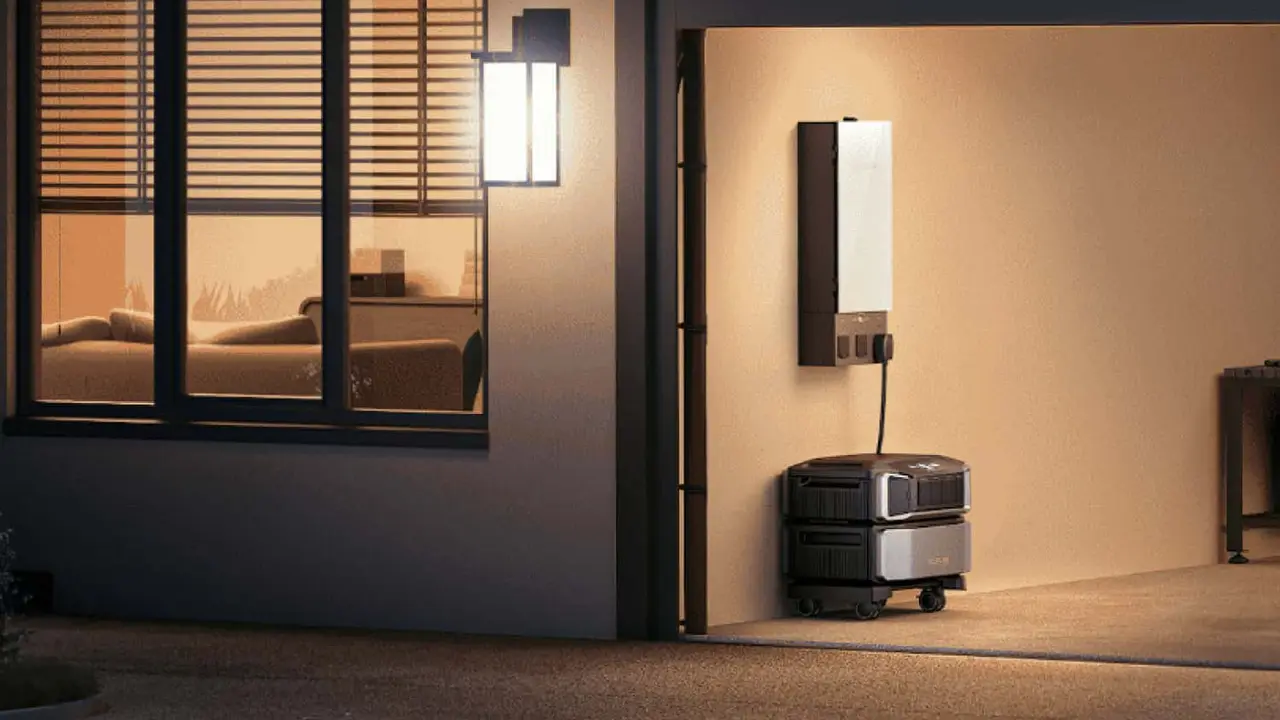
A power station on its own runs only what you plug into it. The Smart Home Panel 2 (SHP2) is a sub panel your electrician feeds from a 100A breaker in your main panel. Up to 12 of your circuits move into it, and it decides whether they run on the grid, the batteries or a generator. Relays switch each circuit on or off from the EcoFlow app, which is how it stretches a battery through a long outage.
It comes in two parts: a distribution panel for the breakers, rated NEMA 3R for indoor or outdoor mounting, and a battery connection box with three battery ports, rated NEMA Type 1, which must stay indoors. EcoFlow says the SHP2 cannot serve as your main panel or service equipment.
Smart Home Panel 2 specs
| Spec | Value (EcoFlow rating) |
|---|---|
| Circuits | 12 branch circuits, breakers up to 60A |
| Service | 120V/240V split phase; 100A panel, 90A storage, 120A busbar |
| Switchover to battery | 20 ms with EPS mode on; about 5 seconds with it off |
| Largest system | 3 DELTA Pro Ultra inverters and 15 batteries: 90kWh, 21.6kW output, 16.8kW of solar |
| Generator input | 120V or 240V split phase, 3 to 12kW, 50A breaker |
| Size and weight | 32.4 x 14.9 x 6.7 in; 52.9 lb |
| Warranty | 10 years from installation |
Which batteries work with the Smart Home Panel 2
| Battery | Units per panel | What EcoFlow's manuals say |
|---|---|---|
| EcoFlow DELTA Pro Ultra | Up to 3 inverters | Charges and discharges through the panel; up to 15 batteries (90kWh) |
| EcoFlow DELTA Pro 3 | Up to 3 | Up to 36kWh with six extra batteries; cannot share a panel with a DELTA Pro Ultra |
| EcoFlow DELTA Pro | Up to 2 | Needs the Double Voltage Hub (Power Input/Output) and a firmware update; one DELTA Pro alone only charges |
A single DELTA Pro powers the house through the panel only alongside a second DELTA Pro or a DELTA Pro Ultra. The DELTA Pro Ultra X is not on the list (EcoFlow pairs it with the Smart Home Panel 3 or Smart Gateway), and neither are smaller DELTA units. One catch applies to every battery: once connected, its own AC outlets stop working, because the panel takes over its output. Its DC ports keep working.
If you have not bought the battery yet, the choice is between the DELTA Pro Ultra ($4,199 at EcoFlow with one 6,144Wh battery; 7,200W at 240V) and the DELTA Pro 3 ($2,799; 4,096Wh, 4,000W at 240V). EcoFlow sells the panel with one DELTA Pro Ultra for $5,599, about $100 less than the two bought separately. Check that the battery is available before you book an electrician.
How backup works: 20 ms only with EPS mode on
EcoFlow's 20 ms figure depends on a setting. With EPS (Emergency Power Supply) mode on, the panel moves your circuits to battery in 20 ms, fast enough for most household electronics, though some desktop PCs can still reboot. With EPS mode off, the switch takes about 5 seconds. Turning EPS mode on also switches off the savings modes, so you choose between the fastest switchover and daily bill savings.
For an outage you sort circuits into three groups. "Must supply" circuits stay on while there is battery left. "Conditional supply" circuits stay on only while the battery is at or above a level you set (50% by default). "No power supply" circuits stay off. Put the fridge, furnace blower and Wi-Fi first and the dryer and range last.
Storm Guard checks the forecast hourly and charges the batteries to 100% when severe weather is due within 24 hours. A gas generator of 3 to 12kW connects through an outdoor inlet box and its own 50A breaker. Switching between grid and generator is manual, with a sliding interlock, and the house gets power about 25 seconds after the generator comes on. EPS mode and the savings modes do not run on generator power, and a generator with a bonded neutral needs that bond removed.
Savings modes, solar and the grid
Above a backup reserve (50% by default), the panel runs one of three savings modes. Self-powered charges the batteries from solar and runs the house on battery down to the reserve. Scheduled tasks charge and discharge at times you set. Time-of-use (TOU) mode charges when power is cheap and discharges at peak rates. Savings come only from shifting your own use, because EcoFlow says the DELTA Pro Ultra cannot feed power back to the grid. Our guide to time-of-use electricity rates shows whether that pays where you live.
Existing rooftop solar on a dedicated breaker in your main panel works alongside the SHP2 and charges the batteries while the grid is up, but it shuts down in an outage like any grid-tied system. EcoFlow advises against wiring rooftop solar into the SHP2 itself, because that can force a new net-metering application (our net metering state guide covers the rules).
Installing a Smart Home Panel 2: what it takes
The warranty counts only if a certified installer does the job: an electrician from EcoFlow's Installation Consulting Service or a certified electrician you hire. Expect a site survey, a permit where required, and about 30 minutes with the power off. EcoFlow's $99 consulting service was free on November 25, 2026, but the installation fee depends on the electrician's assessment, so get a quote first.
The electrician supplies two 100A breakers (one in the main panel, one as the SHP2's main) and moves your chosen branch breakers over. EcoFlow lists compatible Eaton BR, Square D HOM, Siemens QP and GE THQL breakers, including AFCI and GFCI types; plug-on neutral breakers are not supported yet.
Read the warranty terms before you plan the install. The 10 years run from installation at the original address, require a purchase from EcoFlow or an authorized reseller, and exclude RVs, mobile homes, commercial use and moving the panel without EcoFlow's written consent. EcoFlow also warns against putting life-support or medical equipment on remotely switchable circuits, which describes every SHP2 circuit, so plan a separate source for an oxygen concentrator.
Smart Home Panel 2 vs Smart Home Panel 3 vs Smart Home Panel 10
EcoFlow now sells three home panels, and the battery decides which one you need:
| Panel | Battery | Circuits | Price at EcoFlow (Nov 25, 2026) | Warranty |
|---|---|---|---|---|
| EcoFlow Smart Home Panel 2 | DELTA Pro Ultra, DELTA Pro 3, DELTA Pro | 12 | $1,499 | 10 years |
| EcoFlow Smart Home Panel 3 | DELTA Pro Ultra X | 32 | $3,299 | 10 years |
| EcoFlow Smart Home Panel 10 | TITAN home batteries | 10 | $1,199 (240V), $1,099 (120V) | 5 years |
Anker SOLIX Home Power Panel (F3800 and F3800 Plus)
Anker's equivalent serves one or two F3800 Plus or original F3800 units, and it works differently. The Home Power Panel mounts beside your main panel, reads the mains through clamp-on current transformers, and feeds a separate 12-circuit backup load center that holds your essential breakers. Anker sells the pair as the Smart Home Power Kit for $1,799.99, cut to $1,199.99 in a sale running to December 1, 2026.
Anker's owner manual lists 19 lb, indoor installation only (the load center too), a 5-year warranty and 120/240V split-phase service only, not 120/208V. Each power station port takes up to 6kW, and the backup side is rated 12kW (50A) continuous. Modes include self-consumption, peak-and-valley (time-of-use) and Disaster Preparedness, which fast-charges ahead of a storm. The manual gives no switchover time for the panel. Anker's FAQ adds that rooftop solar cannot recharge an F3800 Plus through the panel during an outage.
BLUETTI's two options for the Apex 300
BLUETTI sells two very different ways to wire the Apex 300 into a house.
Apex 300 Home Integration Kit
The budget route: a Reliance Controls sub panel with a built-in 50A inlet, a 50A outlet box, a NEMA 14-50 to SS2-50R cable and a 50A charging cable, for $699 (one Apex 300) or $799 (parallel units) at BLUETTI on November 25, 2026. BLUETTI does not name the Reliance model, and the manual it links is a Reliance catalog page for manual transfer panels, so expect to switch over by hand. BLUETTI mentions no app control or automatic switchover.
BLUETTI Apex 300 Home Integration KitBuy at BLUETTI
BLUETTI AT1 Smart Distribution Panel
The AT1 is BLUETTI's answer to the SHP2, and bigger in one way: its grid and backup ports are rated 160A continuous on 200A breakers, so it can back up a whole home. It takes up to three Apex 300 units through BLUETTI's Hub A1 (the wiring diagrams route even one unit through the hub), plus AC-coupled rooftop solar, a generator it can start automatically, and an EV charger. Modes are Backup (the default), Self-consumption, Time of Use and Custom.
The AT1 manual lists 56.4 lb, a NEMA 3R enclosure, UL 1741 and UL 67 listings among others, and a 10-year warranty. It calls the switch to backup seamless but gives no time in milliseconds, and says not to install it in living spaces or within 1,642 feet of the coast. It cost about $1,300 alone, or $1,440 with the parallel connection cable, at BLUETTI on November 25, 2026.
BLUETTI AT1Buy at BLUETTI
The three systems side by side
| Spec | EcoFlow Smart Home Panel 2 | BLUETTI AT1 | Anker SOLIX Home Power Panel |
|---|---|---|---|
| Works with | DELTA Pro Ultra, DELTA Pro 3 (up to 3), DELTA Pro (up to 2) | Apex 300 (up to 3, via Hub A1), EnergyPro | F3800, F3800 Plus (1 or 2) |
| Circuits | 12, each switchable in the app | Whole home or a backup sub panel, 160A | 12-circuit backup load center |
| Switchover | 20 ms (EPS mode) | No figure published | Not stated in the manual |
| Generator | 3 to 12kW, manual interlock | Yes, with automatic start | Into a power station port, up to 6,000W at 240V |
| Warranty | 10 years | 10 years | 5 years |
| Price (Nov 25, 2026) | $1,499 | About $1,300 | $1,799.99 ($1,199.99 to Dec 1) |
Which should you buy?
Buy the EcoFlow Smart Home Panel 2 if you own, or are about to buy, a DELTA Pro Ultra, DELTA Pro 3 or a pair of DELTA Pros, and want automatic backup you can manage circuit by circuit. It gives the finest control of the three, a published 20 ms switchover and a 10-year warranty. Budget $1,499 plus the electrician's quote.
Pick the AT1 if you have an Apex 300 and want whole-home backup with automatic switching, or BLUETTI's $699 kit if a few circuits flipped by hand are enough. Anker's Home Power Panel is the route for F3800 and F3800 Plus owners. If none of these batteries is in your plans, a manual transfer switch or interlock costs far less; our guide to connecting a solar generator to your house covers those options.
EcoFlow Smart Home Panel 2Check price on Amazon
Frequently Asked Questions
Does the EcoFlow Smart Home Panel 2 work with the DELTA Pro 3?
Yes. Up to three DELTA Pro 3 units connect to one Smart Home Panel 2, for up to 36kWh with six extra batteries. A DELTA Pro 3 cannot share the panel with a DELTA Pro Ultra.
Can I install the EcoFlow Smart Home Panel 2 myself?
No. EcoFlow says only qualified electrical personnel should install it, and the 10-year warranty requires a certified installer, either one from EcoFlow's Installation Consulting Service or a certified electrician you hire. Most areas also need a permit, and the house is without power for about 30 minutes during the job.
Does the Smart Home Panel 2 work with the original DELTA Pro?
Yes, up to two DELTA Pro units through EcoFlow's Double Voltage Hub (Power Input/Output), after a firmware update. A single DELTA Pro on its own only charges from the panel; it powers the house when paired with a second DELTA Pro or a DELTA Pro Ultra.
How fast does the Smart Home Panel 2 switch to battery power?
In 20 ms with EPS mode turned on in the EcoFlow app, and in about 5 seconds with it off. Turning EPS mode on disables the savings modes, such as time-of-use.
Can the Smart Home Panel 2 connect to a gas generator?
Yes. It takes a 120V single-phase or 240V split-phase generator from 3 to 12kW through an inlet box and a 50A breaker. Switching between grid and generator is manual with a sliding interlock, and EcoFlow says the house gets power about 25 seconds after the generator comes on.
Does the Smart Home Panel 2 work with existing rooftop solar?
An AC-coupled rooftop system on a dedicated breaker in your main panel is compatible, according to EcoFlow, but it shuts down during an outage. EcoFlow advises against wiring rooftop solar into the Smart Home Panel 2 itself because it can force a new net-metering application.
What is the difference between the Smart Home Panel 2 and Smart Home Panel 3?
The Smart Home Panel 3 has 32 circuits, costs $3,299 at EcoFlow and is built for the DELTA Pro Ultra X. The Smart Home Panel 2 has 12 circuits, costs $1,499 and works with the DELTA Pro Ultra, DELTA Pro 3 and DELTA Pro. Both carry 10-year warranties.